Last Topic

Tampilkan postingan dengan label Google Chrome. Tampilkan semua postingan

Chrome OS: One Year Later

Rabu, 07 Desember 2011
PhotoI never really imagined this day coming. But it's here. It's one year after Gadgetator's first post ever. So much has happened since them, and a big thanks goes out to Leo Laporte, host of the nationally syndicated Tech Guy radio show, on which Gadgetator got it's big boost. But enough about my blog. Let's get right to what this post's really about.

One year ago, on this day, I posted an article talking about Google's announcement of the Cr48, one of the major advancements in Google's Chrome OS operating system. If you are unfamiliar with what Chrome OS is, read the article here. In that article, I promised I would post a follow up after playing a bit with Chrome OS. I never did. Until now.

A lot has happened with Chrome OS in the past year. For example, a Chrome OS screenshot one year ago (see figure 1), as apposed to a Chrome OS screenshot today (see figure 2). After actually using a device running solely Chrome OS for close to half-a-year, I have developed a new opinion, and I'm here to share that. I guess this article is an overview of Chrome OS: one year later.

Figure 1
In a short recap of what was said in Gadgetator's first ever article, Chrome OS is basically a computer that only has a web browser. When you first open it up, you get your homepage, opening a new tab brings you to a page that basically contains a grid of glorified bookmarks. To a bunch of web pages. This all sounds great and all, but there's one major disadvantage. You lose all of your native applications. No more Photoshop, Microsoft Word, or iTunes. Everything you do has to be done online. Some might say that's impossible. That this'll never work. On first sight, one year ago, that's what I said. I quote myself saying, "There are great web apps out there, but I believe that for this to be a success, there need to be more great web apps. And until we get some of the most widely used native applications online, Chrome OS will be for the very light computer user."


Figure 2
After using Chrome OS almost exclusively for half-a-year, it's apparent I've changed my mind. You see, I was kind of pushed into using Chrome OS. Google offered its Cr48 to a limited number of beta testers to get feedback for the final product. I was one of those lucky recipients. 


Not wanting to just toss aside something  I received for free, plus taking into account what Google actually intended for me to do with the device, I decided to give it a fair try. I never really went back.


I was already stuck in the Google Universe. I used Gmail, Google Docs, Google Reader, and many other online alternatives to native desktop apps. As soon as I switched to Chrome OS, I found it surprisingly easy to find great online alternatives to any desktop apps that I need. Because I have a "real" computer, I could even print directly from Chrome OS using Cloud Print. Of course, I gave up some conveniences, but I believe that was a fair price to pay for the simplicity I now gained. No complex files, programs messing up your system, virus issues, or any other junk that comes along with a Windows or Mac computer. I couldn't have used this as my only computer, I still use iTunes regularly, but it definitely works a great, simple replacement.
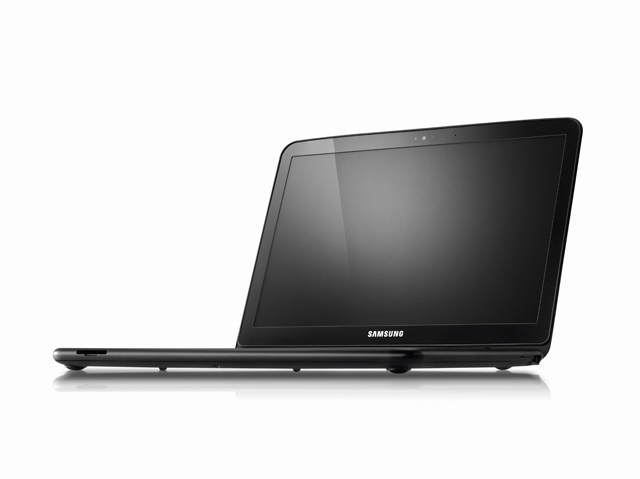
The Samsung Chromebook


Google now licences Chrome OS to manufacturers, who created their own 'Chromebooks'. Currently, both Samsung and Acer have a few models, which run from about $300-$450. At that price, it might be smarter to get a low-end Windows machine, but if you're willing to pay that price for simplicity's sake, it may be worth it. I think that, at this point, Chrome OS and the Chromebooks are great for either simple-computer users who don't want to be confused by the complexities of a "real" operating system, or to be used as a companion to a "real" computer, as Chrome OS has a clean interface, amazing boot time, and easy access to the web.  


Have you played with Chrome OS or the Cr48? Did you take the plunge and buy a Chromebook? What are your experiences with Google's Chrome OS? Like it? Drop a comment below with your experiences.

Netflix, iTunes, K Mart?

Kamis, 30 Desember 2010
     Most are aware of the popular video streaming and downloading services. These include Netflix, iTunes, Amazon's Video on Demand, and more. These are all services that let you either buy individual movies or TV shows, or, in Netflix's case, stream an unlimited number of movies and TV shows for a monthly fee.
     Apparently the idea of getting content online as opposed to walking into a shop such as the slowly falling Blockbuster, which has also started getting into the on demand market, became very popular. Popular enough that Sears and K Mart partnered up with a digital media software company called Sonic to create an online movie and TV show download site called Alphaline Entertainment.
Alphaline Entertainment Homepage
     Alphaline Entertainment may have some catch-up to do, because, although this is not a giant difference, movie buying prices are a few dollars more on Alphaline. The rental prices are the same at $2.99, but iTunes has TV rentals for 99 cents, while Alphaline only has TV purchasing.
     When watching a trailer on Alphaline vs. Amazon, Alphaline's video quality was noticeably better, but took longer to load. On Amazon, the trailer played fine in my Google Chrome browser, but on Alphaline, I had to open Internet Explorer (Which crashed on me. Again). Also, to log in, and pretty much to do anything else on Alphaline, you must be using Internet Explorer or Firefox.
      I then purchased an episode of the 1962 show The Jetsons. When I tried downloading it, the Alphaline Website told me to download the RoxioNow Media Player, which is free. After I got the RoxioNow software, I tried to find a way to download the TV episode. I still have not been able to find a way to download the media.
     Until I can get either 1. My download, or 2. My $1.99 back, I don't plan on using Alphaline again, and I don't recommend it for you. Also, how much do you trust Sears and K Mart to know about downloads, web sites, and software programs?
     For now, Alphaline Entertainment seems like a big red flag. Unless you want to watch high quality movie trailers online.

UPDATE: The problem I had with downloading the video was something with Google Chrome. To download the episode, I needed to be using Firefox, not Internet Explorer or Google Chrome. To watch a trailer on the site, I needed to be using Internet Explorer. Strange, huh?

Well, I did get my $1.99 worth of video, but iTunes: better, cheaper, and easier.

Startup tips: your new PC

Minggu, 12 Desember 2010
 
iTunes
     Those first few days are really fun. You've taken the new laptop out of it's box. It smells new, looks new. Your new $500 baby. You turn it on, waiting for it's first boot, it's first time launching Windows 7, and then it hits you. What can you do with it. All it has is basically a web browser and maybe a trial version of Microsoft Office.
     What do you install, what do you download? This may help.
     First of all, get rid of Internet Explorer, at least until Internet Explorer 9 comes out. I recommend Google Chrome, a  different,  faster, and easier web browser, you can    get it at google.com/chrome.
     If you own an iPod or iPad, iTunes is a must-have, even if you don't      have an iPod, just to organize your music and videos , iTunes is my favorite, get it here at apple.com/itunes.
     You'll probably need a word processor, and if you don't plan on spending at least $150 on Microsoft Office, OpenOffice.org is a great free alternative, it includes a word processor, a presentation maker, a spreadsheet creator, and more. It is available as a free download at openoffice.org.
     A antivirus is very important, and although your PC probably came with a free trial antivirus, you probably want to uninstall that and either  buy an antivirus, or, although it won't work quite as well, install a free one. I personally use Microsoft Security Essentials. Available at .microsoft.com/security_essentials, this free antivirus should work fine for your needs.
     Windows Live Essentials is also a good free set of software. It includes an IM (instant messenger) app, a movie make, a photo gallery app, a blogging app, and more. Available at explore.live.com/windows-live-essentials. Note: many of the Windows Live Essentials reguire a free Windows Live ID, available at http://explore.live.com/.
     If you havn't already, you should look into getting a free Google Account, (available at this link and click on, on the right hand side in the middle, create an account.) which gives you access to Gmail, Google Docs, and much more, some of which might replace actual software.
     You probably will have to get some more software, some of which you will have to pay for, but to get started this is a good list of some free software to get you going.


UPDATE: I got a comment from Riley Quinn recommending ninite.com, which will install almost all of this software and more in one download. You just choose which software to install and click Get Installer. Thanks Riley.


The Future of Web Browsers: Why You Should Be Excited Pt. 3

Senin, 19 Juli 2010
The future of web browsers is a great one, due to the introduction of HTML 5, hardware acceleration, and quickly changing user interfaces in the browser market.

If you do not know what a user interface is, Wikipedia provides a great description:
The user interface is (a place) where interaction between humans and machines occurs. The goal of interaction between a human and a machine at the user interface is effective operation and control of the machine, and feedback from the machine which aids the operator in making operational decisions.
In short, the user interface (also referred to as UI) is what you see when you are using a program. More and more web browsers are improving their UI's to make browsing the web easier on users. They are doing this by cleaning up the UI and making it easier to use and to look at.

Let's take a look at some examples to see the the common UI direction that web-browers are going. First, here are examples of Internet Explorer's UI.

Now, here is a look at the UI's of several recently updated alternative browsers:

The key thing to notice is that browsers are continuing to get more and more minimal. The different design teams have clearly worked hard to make some necessary changes to the browser landscape including:

- Eliminating or hiding unnecessary UI elements to make the browser easier to use.
- Pare down the number of drop-down menus
- Increase focus on the Address bar, back button, and search

Firefox's development team went so far as to create a heat map of the most frequently accessed tools in their browser. I found it to be incredibly interesting to see what tools people used the most. As you can see, this heat map shows where most of the focus in the new UI's of the browsers are coming from. These types of studies influence changes made to the browsers UI, which will benefit the average user.

The future continues to rely more and more on the web, and knowing that designer and developers are making it easier to use is a comforting thought.

Be sure to check out my post next week in this four part series on "The Future of Web Browsers: Why You Should be Excited." Next week I will talk about the interesting push toward web applications.

The Future of Web Browsers: Why You Should Be Excited Pt. 1

Selasa, 29 Juni 2010
Believe it or not, web browsers have really not come all that far.

Yes, Internet Explorer, Firefox and Chrome have upped the ante when it comes to speed, usability, and safety, but the basics behind how a web page is rendered is still the same as it was in 1997, when HTML 4.0 was introduced.

The good news is that, beginning with the introduction of HTML 5, web browsers are beginning to make some serious changes that will benefit all users in the future. Many browsers have added HTML 5 support already including Firefox, Opera, Safari, and Chrome. Microsoft is planning HTML 5 support for Internet Explorer 9.

Let us look at why HTML 5 is going to help you:
  • Better looking webpages, that are faster and leaner
  • Advanced browser functionality such as "Drag and Drop" and embedded video that doesn't require a plugin, such as Flash.
  • Offline storage
You can see that some of these features are already in use on sites such as Gmail, which allows you to "drag and drop" images into your email. Youtube is also adopting HTML 5 and allows some videos to be viewed without the required Adobe Flash plugin. Instead, you are able to watch the video using the HTML 5 player.

If you are running an HTML 5 compatible browser, you can join the beta testing group here for the HTML 5 Youtube video viewer. You can then check out this video of the world celebrating Landon Donovan's game-winning goal.


HTML 5 is just the beginning of why you should be excited about the future of web browsers. Be sure to check out Part 2 next week when I talk about my favorite upcoming feature: Hardware Acceleration.

DoGooder Extension/Addon Aims to Raise Money for Green Initatives

Minggu, 09 Mei 2010
The other day, I was surfing one of my favorite blogs, Downloadsquad, and came across a great article by Lee Mathews about the DoGooder extension for Chrome/Firefox. The extension replaces advertisements on websites with those of "green initiatives and movements for positive social change."

My favorite feature of the extension is that it blocks ugly, frustrating, and just plain annoying advertisements with interesting, colorful, and surprisingly informative ads. Also, I do not have to feel guilty for blocking the advertisements on the site because, as Lee Mathews explains:
Unlike extensions such as AdBlock, DoGooder doesn't actually block a publisher's original ads. Instead, it loads them and then covers them up with its own ads. That's a good thing for publishers, since it means their ad impressions won't be affected. DoGooder also maintains a whitelist of websites which have similar advertising practices, and the extension allows users to flip back to the original ads if they wish to do so.
The only thing I wish I could change with DoGooder is the added icon to the Chrome interface. I hope this will be optional in the future. For additional details about the DoGood program, check out the DoGood Headquarters website.

The DoGooder Extension is available for Chrome and Firefox. I highly recommended it!

Explorer? Firefox? Chrome? Competition among Internet Browsers Heats Up

Kamis, 13 Agustus 2009
Amy Barzdukas, a general manager at Microsoft in charge of the company's Internet Explorer browser, said that the recent announcement that Firefox – the chief competitor to Microsoft’s browser – has reached a billion downloads was "interesting math".

"It's an interesting number and I have not seen the math [but] how many Internet connected users are there? 1.1 billion, 1.5 billion, something in that area."

Firefox claimed it had passed the 1 billion downloads mark at the end of July, a figure which includes every update and all downloads made since the program was first launched in 2004.

Since its inception, Firefox has chipped away at Microsoft's dominant position and is now the world's second most popular web browser with 22% of the market, in comparison to 67% for the family of Internet Explorer programs.

If you have only used Internet Explorer as your browser, and are interested in trying some others, you might want to start here for an overview of what’s out there, or read a review of Google’s Chrome, the latest entry into the competitive browser field.

And if you are happy with Internet Explorer, but not yet using Microsoft’s latest release – IE 8 – click here for a review.

[via guardian.co.uk]

Early Release of Google Chrome for Macs Now Available

Jumat, 05 Juni 2009
Google has issued an early preview release of its Chrome browser for Mac OS X and Linux, though the company warns that the download is "an incomplete, unpredictable, and potentially crashing software." Nevertheless, if you are a Mac user and you like to play with problematic software, you can download it here.

When Google launched Chrome last year, the browser was available only on Windows. It is used by about 1% of computer users, according to recent numbers.

If you are a Windows user and are interested in browsers other than Microsoft's Internet Explorer, here are some ideas. Or read our review of Google Chrome for Windows.

Looking for An Alternative Browser? Try Google Chrome 2.0

Rabu, 27 Mei 2009
Google Chrome is a relatively new browser that has quickly gained popularity in the Internet community. Since its initial release, Chrome has seen many fixes and improvements to improve its speed and stability. These updates were so significant that Google quickly removed the "beta" tag off of its new browser in an effort to promote its stability and everyday usability.

I do a majority of my Internet browsing on Google Chrome due to its speed and other features. Here are some of my favorite ones.


Speed, Speed, and More Speed
One of the most noticeable features of Google Chrome is its speed. It is fast to boot up, and fast to load pages. It feels faster then Firefox, and most definitely Internet Explorer in my everyday use.

Each Tab Has Its Own Process
Each tab has its own individual process; if one tab crashes, you do not lose the rest of your opened tabs. This is extremely helpful when you are doing research and each tab is important to keep open.

The Download Manager
Downloads are handled differently in Google Chrome then they are in IE and Firefox. In both IE and Firefox, the downloads are opened in a new window to be monitored. In Chrome, downloads are started immediately and can be monitored in the task bar, as shown in the picture above.

Simple Design
One of the subtle, yet, impressive features of Chrome is the simple design layout of the tabs, address bar and navigational icons. This browser is designed for maximum screen real-estate for viewing web pages. I find the tab layout to be quite helpful.

The New Tab Page
While this feature may not seem like a big help initially, it most certainly is a welcome addition. The new tab page shows a lot of information such as your top nine most visited sites, previous searches, recent bookmarks, and recently closed tabs.

Searching From the Address Bar
By default, Google allows you to type a search into the address bar. Then, by simply hitting the ENTER key, you are taken to Google search results. If you go to another site and perform a search, you will then be able to simply hit the tab key when typing in the site name to perform a search on that site (see the screenshot above for an example).

Updates
This past week, Google officially released its first major milestone update to Chrome. This update packed tons of added enhancements, bug fixes, and stability improvements. Here is a quick rundown of some of the enhancements specific to the 2.0 update courtesy of Google.


Where Can I Get Google Chrome?
Visit www.google.com/chrome

Google Chrome Ads Come to Television

Senin, 11 Mei 2009
Google has launched its first television advertising campaign for Google Chrome, the company’s nine-month-old web browser.

I find it a little odd to advertise web browsers on television. Late at night, watching reruns of The Simpsons, I usually don’t think to myself, “I wonder if I could be more productive with a better web browser?”

Nevertheless, the marketing people at Google know better than I do, I suppose. Clearly, the company is making a push to cash in on an increasingly large percentage of Internet users – estimated as high as 30-40% – who are looking for alternatives to Microsoft’s Internet Explorer.

Let us know what you think:


Interested in Options to Internet Explorer? Here Is a Start

Rabu, 29 April 2009
As Technology Librarian John Robertson and I were finishing up a Google Reader class for Library staff recently, we began to talk about different browsers. While we at The Tech Desk use mostly the open-source browser, Firefox, the majority of librarians at Troy use Internet Explorer. We taught the class using IE, but answered some questions about Firefox.

John mentioned that he uses Google Chrome as his browser. Many staff members were curious about it, never having heard of Chrome.

This made me wonder which browsers are being used by our readers. Since we use Google Analytics to track our readership, I was able to answer that question fairly easily.

First, let us look at the big picture. Worldwide, Internet Explorer’s share of the browser market is declining. Now, about 66% of surfers use IE. At the same time, Firefox has increased its market share to around 21%. Apple’s Safari browser makes up 8% of the market, and Google’s Chrome about 1%.

Our readers look a lot like those worldwide. About 57% use Internet Explorer, down about 5% since September 2008, when we started keeping statistics. Firefox use has remained fairly constant at 36%. Apple users are starting to find us in greater numbers, as Safari use is up almost 38%, to 3% of our users. Google’s Chrome, the newest entry in the field, is up 25% since September, to 2% of users.

However you look at these numbers, it is clear that a large percentage of Internet users – somewhere between 33% and 40% -- use a browser other than Internet Explorer.

If you are interested in looking at browser options for your surfing, compare Internet browsers of today and tomorrow.

And to learn more about Google Chrome, check out these short videos from the Official Google Blog. Some of them are pretty good.

Microsoft Admits Security Flaw, Reports CSM

Selasa, 16 Desember 2008
According to Andrew Heining, writing on the Christian Science Monitor's technology blog Innovation:
There’s a critical security hole in Internet Explorer, the world’s most popular web browser.

The unpatched vulnerability, first discovered by hackers and recently acknowledged by Microsoft, could allow someone to gain access to a computer through a website that executes a malicious code. Some 10,000 sites have been compromised so far, putting passwords, financial data, and other sensitive information at risk.

In a lengthy security advisory memo on its website, Microsoft urges users to change their “Internet zone security setting” to “high” and to run the browser in “Protected Mode.”

According to the post, savvy surfers can protect their machines, "[b]ut the easier solution may just be to drop IE."

With alternate browsers Firefox and Google's Chrome gaining in popularity, Microsoft's dominance of the browser market may be at an end.

Last Photo